Config Transfer: Test → Production
Move the customizations you built and tested on one database to another, safely.
Requirements
- Odoo 18.0, 19.0 or 20.0 — the same version on both databases.
- The app installed on both databases (test and production).
- A Settings administrator on each side.
- To move automation rules, the Automation Rules app installed on both sides.
Create a package (test database)
- Open Config Transfer → Export (packages) and click New. Give it a name, e.g. “Loyalty points”.
- Click Add customizations. Choose the types, optionally a Changed since date or a name, and click Search.
- Keep the ones you want and click Add selected.
Only customizations (on by default) leaves out everything that belongs to installed modules, so you only see what you built.
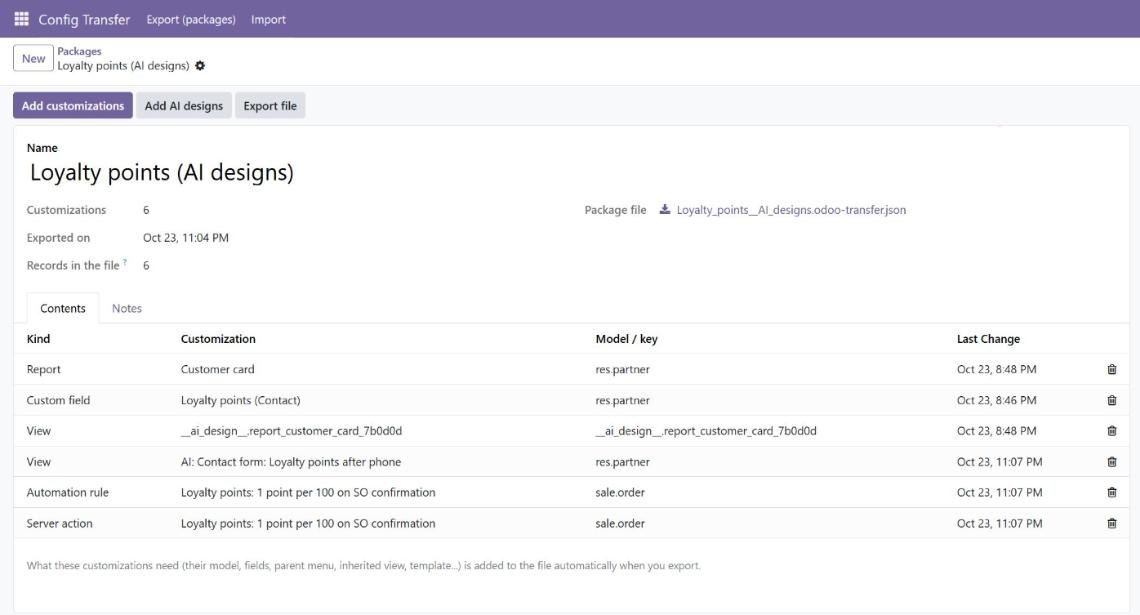
Export
Click Export file. The file contains your customizations and everything they need: the custom model and its fields, the view they inherit from, the parent menu, the report template, the actions of an automation rule. Records are matched by external id, so database ids never matter.
Import and preview (production)
- Open Config Transfer → Import, click New and upload the file.
- Click Preview. Each record is listed as will be created, will be changed, already identical or cannot be applied.
- Open a changed line to see the difference: old and new values, or a line-by-line diff for views, code and e-mail bodies.
- Untick what you do not want to apply.
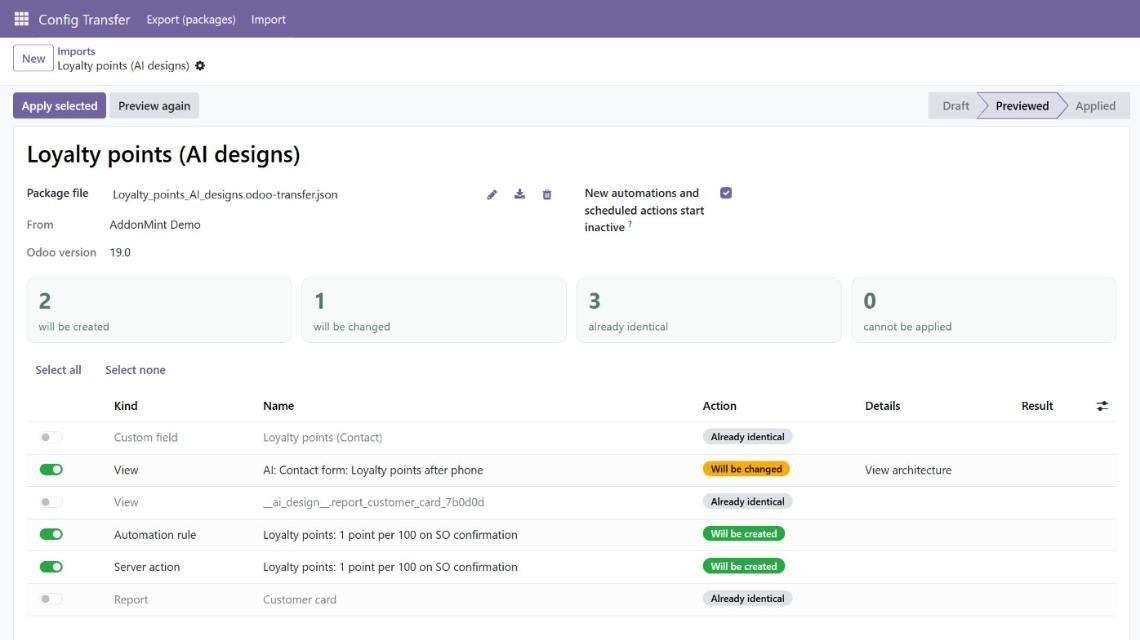
Apply and roll back
Apply selected writes every selected change in one transaction: if one fails, nothing is written. If someone edits one of these records in production after the preview, the apply stops and asks you to preview again.
New automation rules and scheduled actions start inactive (you can change this before applying): review them in Settings → Technical and activate them.
Roll back removes what the package created and restores what it changed.
AI designs
If you use Connect any AI to Odoo with design tools on your test database, Add AI designs adds everything Claude or ChatGPT built there to the package in one click.
What moves, what does not
Moves: custom models and fields (with selection values), views and report templates, window actions, menus, server actions, automation rules, scheduled actions, PDF reports, e-mail templates, groups, access rights, record rules, system parameters and shared filters.
Does not move: business data (contacts, orders...), records that belong to installed modules, and secrets — parameters named like password, secret, token or API key, the base URL and database ids.
Troubleshooting
- “Missing in this database: …” — the record needs something production does not have. Add it to the package on test, or install the app it belongs to.
- “This package comes from Odoo …” — export from a test database on the same Odoo version.
- “… was changed in this database after the preview” — click Preview again, then apply.
Questions about a transfer?
Tell us your Odoo version and what you are moving — we reply within one business day.
Contact support